
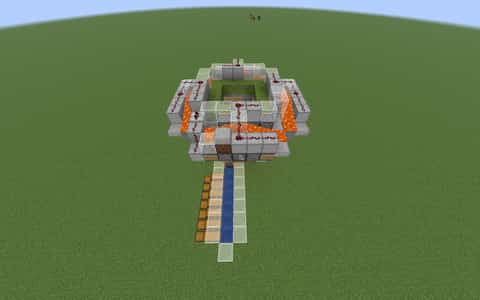
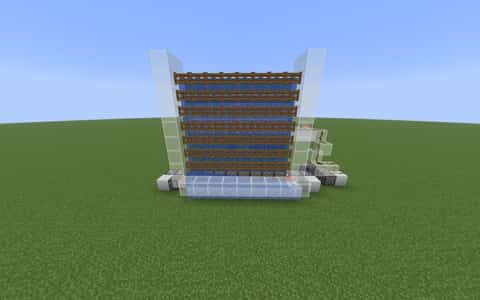
Spruce Slab Farm [V1]
![Spruce Slab Farm [V1] image 1](https://cdn.donut.build/cdn-cgi/image/width=1600,quality=98,format=auto,height=900,fit=cover/image/tT156QPzzghe7bSCdpLZG0UAxKNKRflC/1787604426591-6b329c17-7c53-47c3-9710-0693a396a631.png)
User Description
this is my first farm I will upload here please review it and tell me if I need any fixes or anything like that.
Details
Initializing...
Rough estimate using the latest auction house (/ah) price history. Actual in-game prices can vary.
| Material | Unit Price | Count | Subtotal |
|---|---|---|---|
| $7,604.50 | 225 | $1,711,012.50 | |
| $4,122.50 | 82 | $338,045.00 | |
| $2,332.02 | 50 | $116,601.17 | |
| $2,272.00 | 29 | $65,888.00 | |
| $218.75 | 274 | $59,937.50 | |
| $533.59 | 72 | $38,418.74 | |
| $2,496.50 | 15 | $37,447.50 | |
| $1,523.44 | 18 | $27,421.88 | |
| $5,312.49 | 1 | $5,312.49 | |
| $4,994.00 | 1 | $4,994.00 | |
| $78.13 | 52 | $4,062.50 | |
| $92.96 | 23 | $2,138.10 | |
| $994.00 | 1 | $994.00 | |
| $851.56 | 1 | $851.56 | |
| N/A | 11 | N/A | |
| N/A | 14 | N/A | |
| N/A | 2 | N/A | |
| N/A | 50 | N/A | |
| Total | $2,413,124.95 | ||


Comments
Sign in to leave a comment.
Koberka Zbój
about 2 months ago
it doesnt make slabs it makes buttons
PlackiEnjoyer
about 2 months ago
the crafters are too slow (the fix is easy, just break the 2 repeaters in the redstone clock connected to crafters and replace it with redstone dust with the comparator subtracting. also one crafter wont work, just break the repeater connecting it) and you should make a version with shulker loaders (im lazy to experiment it with myself because i use my own farm) so getting the slabs out is easier. overall this is a nice, easy to build, doesnt cost a lot and compact farm that makes a decent amount of money and is perfect for beginners. 4/10 (6.5/10 after fixing farm)
EMFlash638
2 months ago
Works correctly, make sure you buy from orders, not ah, or build a tree farm
ThatAverageDevDude
2 months ago
How is it?
How to Use This Schematic
To use this schematic in your Minecraft world, you will need the Litematica mod installed on Minecraft Java Edition.
- Install Litematica using Fabric or Forge.
- Place the .litematic file inside your schematics folder.
- Launch Minecraft and open the Litematica menu.
- Load the schematic and position it in your world.
- Begin placing blocks following the preview overlay.
Tips & Requirements
You will need Minecraft Java Edition with the correct version of Litematica installed.
If the file does not appear in-game, confirm the .litematic file is in your schematics folder and that your mod version matches your game version.
Use the placement preview before building so you can rotate or move the structure if needed.
Learn More
Import the file into your preferred schematic tool and verify version compatibility before placing it in-game.
Trying to get famous
2 months ago
How much does it make an hour?